
THE PORTFOLIO / SELECTED SYSTEMS & PROJECTS
Real processes.
Thoughtfully built.
I’m Carl, a CRM and automation specialist with 5+ years of GoHighLevel experience. Here’s a closer look at my work across customer journeys, recruitment, operations, and workflow audits.
SELECTED PROJECTS / THE SYSTEMS BEHIND THE WORK
See how the work connects.
Explore seven projects, from the workflow itself to the business process behind it.
- TRIGGEREnquiryNew lead enters the journey
- ACTIONInitial contactFirst-contact workflow
- ACTIONNurtureContinued lead follow-up
- ACTIONAppointmentBooking communication
- ACTIONReview requestPost-appointment review prompt
GOHIGHLEVEL · CUSTOMER JOURNEY
Medspa customer journey
From a new enquiry to the next appointment, with a clear next step along the way.
 GoHighLevel
- Capture new enquiries and organize initial contact.
- Nurture leads and coordinate appointment communication.
- Handle stale leads and cancellations alongside the main journey.
- Prompt review requests after the appointment stage.
- ENTRYApplicant intakeForms & applicant intake
- ACTIONPipelineRecruiting stages
- ACTIONReview & feedbackCollect reviews & feedback
- ACTIONAssignmentProvider assignment logic
- ACTIONFollow-upInternal notifications
GEM + GOHIGHLEVEL · RECRUITMENT
Healthcare recruitment system
A structured journey for applicants, reviews, provider assignment, and follow-up.
 Gem
Gem- GoHighLevel
- Organize applicant intake with forms and recruiting stages.
- Collect candidate reviews and feedback.
- Coordinate provider assignment and internal notifications.
- Support the next handoff with follow-up workflows.
 Financial & task automationIllustration
 Task / payment formForm trigger
 RoutingRules & assignment
 Master logGoogle Sheets
- Hours & costsCalculations
- ReportingOperations overview
N8N · OPERATIONS & REPORTING
Financial & task automation
Connect form intake, staff assignment, recorded hours, and financial visibility.
- n8n
- Google Sheets
 Google Apps Script
 Slack
Slack
- Capture task, payment, and expense information through forms.
- Apply routing and assignment rules, then record the work in master logs.
- Use completed hours to support labor-cost calculations.
- Feed monthly records into financial reporting and dashboards.
SaaS operations support
FOUR GOHIGHLEVEL WORKFLOWS
- TRIGGEROnboarding form submittedForm Submitted · onboarding intake
- ACTIONAssign onboarding ownerAssign To User
- ACTIONSend welcome emailSend Email · next steps
- ACTIONCreate onboarding taskAdd Task · requirements checklist
- HANDOFFNotify the account teamSend Internal Notification
- TRIGGERSetup request submittedForm Submitted · account setup
- ACTIONAssign setup specialistAssign To User
- ACTIONCreate configuration taskAdd Task · setup checklist
- ACTIONSend setup acknowledgementSend Email · request received
- HANDOFFNotify the setup ownerSend Internal Notification
- TRIGGERSupport form submittedForm Submitted · support request
- ACTIONCreate support ticketCreate/Update Opportunity · support pipeline
- ACTIONAssign support ownerAssign To User
- ACTIONSend acknowledgementSend Email · request received
- HANDOFFNotify the support teamSend Internal Notification
- TRIGGERBilling form submittedForm Submitted · billing request
- ACTIONAssign billing ownerAssign To User
- ACTIONCreate billing review taskAdd Task · review request details
- ACTIONSend acknowledgementSend Email · request received
- HANDOFFNotify the billing teamSend Internal Notification
GOHIGHLEVEL · SAAS OPERATIONS / 01
Client onboarding workflow
Give a new customer a clear welcome and an owner for the next step.
- GoHighLevel
- Start when the onboarding intake form is submitted.
- Assign the contact to the onboarding owner.
- Send a welcome email and create a requirements checklist task.
- Notify the account team so they can coordinate the next step.
GOHIGHLEVEL · SAAS OPERATIONS / 02
Account setup workflow
Route a setup request to a specialist with a clear checklist and customer acknowledgement.
- GoHighLevel
- Start from an account setup request form.
- Assign the contact to a setup specialist.
- Create a task covering the agreed CRM configuration and QA checklist.
- Acknowledge the request and notify the owner; configuration and approval remain human work.
GOHIGHLEVEL · SAAS OPERATIONS / 03
Support ticketing workflow
Turn a support form submission into an assigned, trackable support request.
- GoHighLevel
- Capture the support request through a form.
- Represent the ticket as an opportunity in a support pipeline.
- Assign an owner and send an acknowledgement email.
- Notify the support team to investigate, update the stage, and coordinate resolution.
GOHIGHLEVEL · SAAS OPERATIONS / 04
Billing request workflow
Acknowledge billing questions and put the review in the hands of the right person.
- GoHighLevel
- Start when a billing request form is submitted.
- Assign the contact to the billing owner.
- Create a task to review the account, subscription, or refund question.
- Acknowledge the request and notify the billing team; financial decisions are reviewed separately.
- TRIGGERLead captureFunnels & forms
- ACTIONSegmentationContact organization
- ACTIONPipeline stageTrack lead position
- ACTIONFollow-upContinue communication
- ACTIONSales handoffTeam next steps
GOHIGHLEVEL · PROPERTY LEAD JOURNEY
Real estate CRM & automation
Give property enquiries a place, a follow-up path, and an owner for the next step.
- GoHighLevel
- Capture enquiries through funnels, landing pages, and forms.
- Organize imports, segmentation, and pipeline stages.
- Support follow-up, reply handling, and sales handoffs.
- Create reusable snapshots and troubleshoot client setups.
- MAPPED STAGEEnquiryConfigured entry points
- MAPPED STAGETrial bookingTrial booking paths
- MAPPED STAGEAttendanceFollow-up & decision paths
- MAPPED STAGEEnrolmentConfigured transitions
- MAPPED STAGEMembershipMembership & payment branches
GOHIGHLEVEL · CURRENT-STATE AUDIT
Customer journey audit
Make a membership journey understandable through a map of 73 existing workflows.
- GoHighLevel
- Map 73 existing workflows into one current-state customer journey.
- Trace enquiry, trial booking, attendance, enrolment, and membership.
- Document waits, branches, stage changes, and configuration gaps.
- Deliver a 15-page map with workflow traceability and findings.
Weekly & monthly reportingIllustration Weekly scheduleSchedule triggerMonthly scheduleSchedule trigger
- Fetch weekly logsGoogle SheetsFetch monthly logsGoogle Sheets
- Prepare report datasetCode
- Build operations reportCode
 Create HTML fileConvert to file
 Save reportGoogle Drive
 Email reportGmail
N8N · WEEKLY & MONTHLY REPORTING
Weekly & monthly reporting
Turn weekly and monthly Master Logs into an HTML operations report, with Drive and email steps.
- n8n
- Google Sheets
- Google Drive
- Gmail
- Start from separate weekly and monthly schedule routes.
- Read Google Sheets Master Logs and attach the reporting period.
- Build an HTML operations report with four KPI tiles and hours breakdowns.
- Use configured Google Drive and Gmail steps to save and email the report.
PROJECT 01 / GoHighLevel · Lead nurture · Appointments
Medspa customer journey
A coordinated journey from first enquiry to the next appointment.
- GoHighLevel
The situation
A medspa needed lead handling, appointment communication, and review requests organized across the customer journey.
What I owned
I created workflows for new leads, initial contact, nurture, stale leads, appointment booking, cancellations, and review prompts.
PROJECT 02 / Gem & GoHighLevel experience · Pipelines · Candidate reviews
Healthcare recruitment system
A clearer process for the people behind patient care.
- Gem
- GoHighLevel
The situation
Recruitment teams needed a structured way to organize applicants, collect feedback, and coordinate follow-up.
What I owned
I built recruiting pipelines, forms, surveys, dashboards, internal notifications, and provider assignment logic. My recruitment experience includes Gem and GoHighLevel.
PROJECT 03 / n8n · Google Sheets · Apps Script · Slack
Financial & task automation
Connect the work being done with the numbers behind it.
- n8n
- Google Sheets
- Google Apps Script
- Slack
The situation
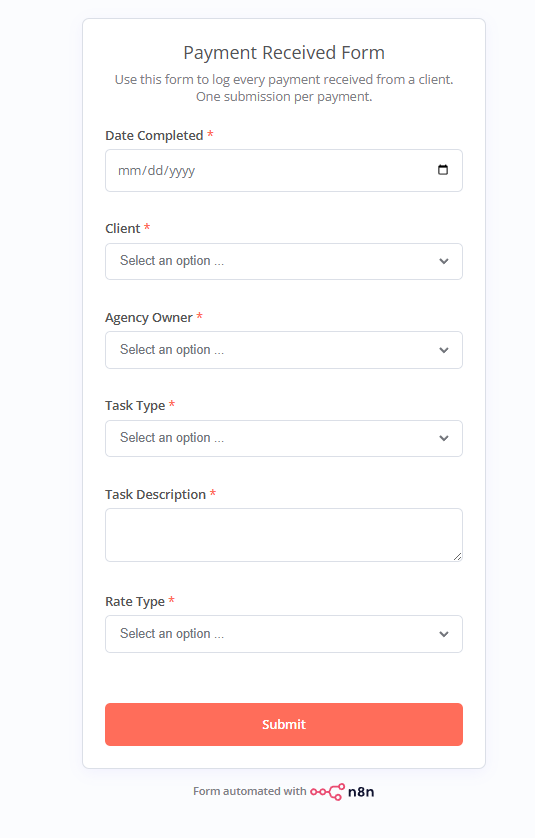
A multi-brand operation needed structured task intake, staff assignment, cost tracking, and reporting without repeatedly reconciling separate records.
What I owned
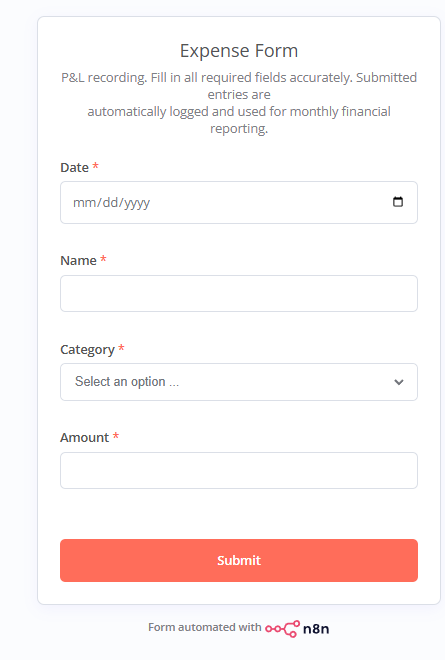
I built form-driven routing, task categorization, master-log recording, labor-cost calculations, monthly-hour updates, expense tracking, and an executive financial dashboard.
View original form examples +
A SEPARATE COMPONENT / 10-NODE WORKFLOW
Task & payment chat assistant
I also created an n8n assistant with an OpenAI model, chat memory, intent extraction, and conditional routing.
- n8n
 OpenAI
- Google Sheets
- Slack
PROJECT 04 / GoHighLevel · Subscription operations · Support SOPs
SaaS operations support
The everyday processes that keep a platform usable.
- GoHighLevel
The situation
SaaS owners need consistent onboarding, customer support, subscription handling, and clear internal handoffs.
What I owned
I supported CRM setup and customer communication, and created documentation for billing inquiries, subscription journeys, refund handling, recurring tasks, and technical escalation.
PROJECT 05 / GoHighLevel · Funnels · Lead follow-up · Snapshots
Real estate CRM & automation
Give every property enquiry a place and a next step.
- GoHighLevel
The situation
Real estate teams needed organized lead capture, pipeline stages, follow-up, and reusable client setup.
What I owned
I built funnels, landing pages, forms, calendars, pipelines, follow-up automations, and reusable snapshots. I also handled imports, CSV mapping, segmentation, and troubleshooting.
PROJECT 06 / GoHighLevel audit · 73 workflows mapped · Current-state documentation
Customer journey audit
Make a complex membership journey understandable.
- GoHighLevel
The situation
A class-based membership business needed a clear view of how its existing workflows connected across enquiries, trials, enrolment, and payment.
What I owned
I audited and mapped 73 existing workflows into a current-state customer journey, documenting visible triggers, branches, waits, stage changes, and gaps requiring verification.
What the work shows
Delivered a 15-page journey map with workflow traceability and configuration findings. This was audit and mapping work, not authorship of all 73 workflows or proof of successful live execution.
A wait label and its setting told different stories.
The audit recorded a step labelled “3 Hours” with a visible setting of 3 minutes. The finding was documented for inspection and an approved timing test; no completed fix is claimed.
PROJECT 07 / n8n · Google Sheets · Google Drive · Gmail
Weekly & monthly reporting
Two reporting periods. One reusable operations report.
- n8n
- Google Sheets
- Google Drive
- Gmail
The reporting flow
Separate weekly and monthly routes read Master Logs from Google Sheets, attach the reporting period, and feed a shared report-building path. Code steps prepare the dataset and build the operations report before conversion to an HTML file.
What the report contains
Four KPI tiles, a completed-work table, hours by project, and hours by team member. Google Drive and Gmail nodes are configured to save and email the finished report.
What the screenshot shows
A configured n8n workflow, including a manual weekly test entry and setup notes before activation. It establishes the workflow structure; successful scheduled runs, saved files, and delivered emails are not confirmed by this image.
YOUR PROCESS COULD BE NEXT
Start with what
isn’t working.
You don’t need a technical brief. Tell me where your team is losing visibility, time, or ownership.
Tell me what’s not working ↗Explore the $500 Focused Audit →